
Walk into any coffee shop today and you will see a familiar scene: a sleek tablet, propped up by a keyboard case, its owner staring intently at a split-screen interface. The message from the manufacturers is clear and persistent. The iPad Pro M5 and the Samsung Galaxy Tab S11 Ultra are no longer just consumption devices. With specs that rival premium laptops—desktop-class chips, stunning high-refresh-rate displays, and terabytes of storage—they are positioned as legitimate laptop replacements. On paper, the argument is compelling. Yet, a curious pattern persists. When the work gets serious, when deadlines loom and complexity mounts, the same user will often reach past their $1,500 tablet for a clamshell laptop. The question is not whether these tablets are powerful enough, but why, in the physics of actual workflow, they consistently fall short.
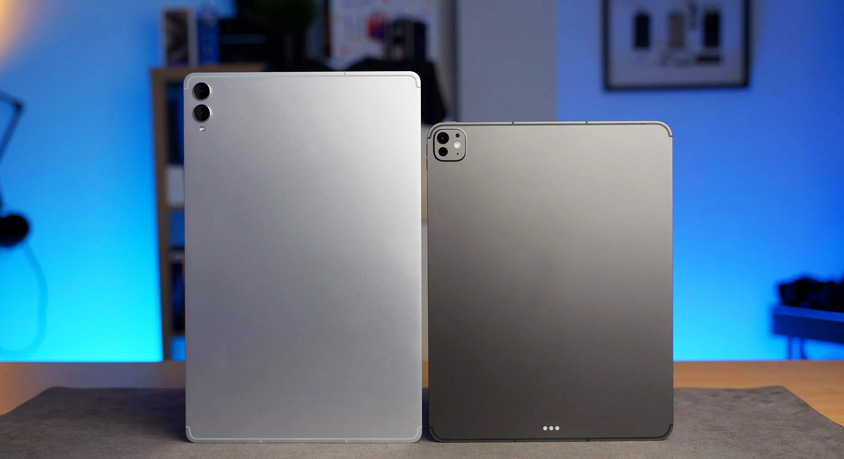
The iPad Pro M5 is a testament to precision engineering. It is impossibly thin, the flat-sided aluminum chassis feels dense and cool, and the weight distribution makes it feel lighter than its numbers suggest. The Samsung Galaxy Tab S11 Ultra takes the opposite approach, with a massive 14.6-inch AMOLED display that is almost absurdly cinematic. Holding it feels like carrying a small, portable television. For a creative professional sketching in a park or a consultant reviewing PDFs in a client's lobby, the physical immediacy of these devices is unmatched. They disappear into a bag in a way that even the lightest laptop cannot.
And those displays deserve their praise. The iPad's tandem OLED panel is a technical marvel, delivering breathtaking brightness and contrast for HDR video editing. The Samsung's AMOLED screen, with its deep blacks and vibrant colors, is a visual feast for photo editing or media consumption. Battery life on both is robust; you can easily stream video for an entire transatlantic flight without reaching for a charger. For a student annotating lecture slides or a traveler consuming content, they are near-perfect devices.
The performance gap has also vanished. The M5 chip in the iPad Pro handles 8K video renders with a speed that would embarrass many desktop computers. The Snapdragon X Elite chip in the Tab S11 Ultra manages complex multitasking with equal poise. In raw computational throughput, these tablets have transcended their category. For a photographer importing and culling images in the field using Lightroom, the tablet workflow is not just viable, but often more intuitive with a stylus.
Yet, here is where the illusion begins to crack. Let's move from the coffee shop to a more demanding scene. You are a management consultant at an airport gate. You have a final report to submit before boarding. You have four browser tabs open for research, a 50-page PowerPoint deck with complex charts, a Word document for executive summaries, and a Slack window for team coordination. On a laptop, this is a standard, if mildly stressful, workflow. On a tablet, it becomes a study in friction.
The iPad's Stage Manager and Samsung's DeX mode are valiant attempts to solve this. They create windowed environments that mimic a desktop. But the experience is one of constant negotiation. Resizing a window requires pixel-perfect finger precision or a trackpad. Dragging a chart from a browser into a presentation often fails in ways that don't happen on a MacBook or Windows laptop. The file management system, particularly on iPadOS, feels like a walled garden; moving a file from an email attachment to a cloud folder requires steps that a laptop user would find archaic. The software, despite being powerful, operates in a fundamentally different paradigm—one optimized for single-app, touch-first interaction, not the chaotic, multi-threaded workflow of actual knowledge work.
The accessories, which are mandatory for any serious work, further expose the paradox. A Magic Keyboard for the iPad Pro adds significant weight and cost, turning the svelte tablet into a top-heavy laptop that lacks the stability of a traditional clamshell on an actual lap. On a cramped airplane tray table, the iPad in its keyboard case wobbles; a laptop's hinge provides a solid, grounded foundation. The S-Pen is wonderfully responsive on the Galaxy Tab for note-taking, but the software for handwriting conversion, while improved, still requires proofreading that a typed note does not.
This is not to say these tablets lack a professional purpose. For specific verticals, they are indispensable. The iPad Pro M5 is the ultimate digital canvas for an illustrator or a musician using it as a sheet music reader and recording interface. The Samsung Galaxy Tab S11 Ultra is a fantastic second screen for a video editor or a powerful portable display for a photographer. They excel in consumption and in focused, single-task creative workflows. They are also excellent devices for users whose primary "work" is communication and media—checking email, browsing, taking light notes.
But for the vast majority of knowledge workers whose daily reality involves complex document creation, multi-source research, and constant application switching, the friction remains. The hardware has caught up, but the software paradigm is still playing catch-up. The tablet asks you to adapt to its way of working; a good laptop adapts to yours.
Who, then, is this illusion for? The iPad Pro M5 is for the creative professional who needs a powerful sketchpad and media device, and is willing to also own a laptop for heavy lifting. The Galaxy Tab S11 Ultra is for the media enthusiast and note-taker deeply embedded in the Samsung ecosystem who occasionally dabbles in light productivity. They are not for the user who wants a single device to rule them all. That user will still find themselves, on a Sunday night with a deadline looming, closing the tablet and opening the laptop. The device that can do almost everything still can't do the one thing that matters most: getting out of your way and letting you work.
Disclaimer: Mention of any brand or trademark is for identification only and does not imply partnership or endorsement