The latest iPad Pro, equipped with the formidable M4 or M5 chip, presents a unique paradox in modern computing. It is, by the raw metrics of silicon design, one of the most powerful personal computing devices you can buy. Its CPU and GPU benchmarks rival those of high-end laptops. Its OLED or mini-LED display is stunning, its design impossibly thin and light. Yet, upon using it, a profound cognitive dissonance sets in. You are wielding a Formula 1 engine, but the only road you are permitted to drive on is a meticulously curated, albeit beautifully landscaped, suburban cul-de-sac. This is the central tension of the iPad Pro: it is not a bad computer replacement because of its hardware, but in spite of it. The waste is not in the chip, but in the deliberate constraints of the operating system built around it.
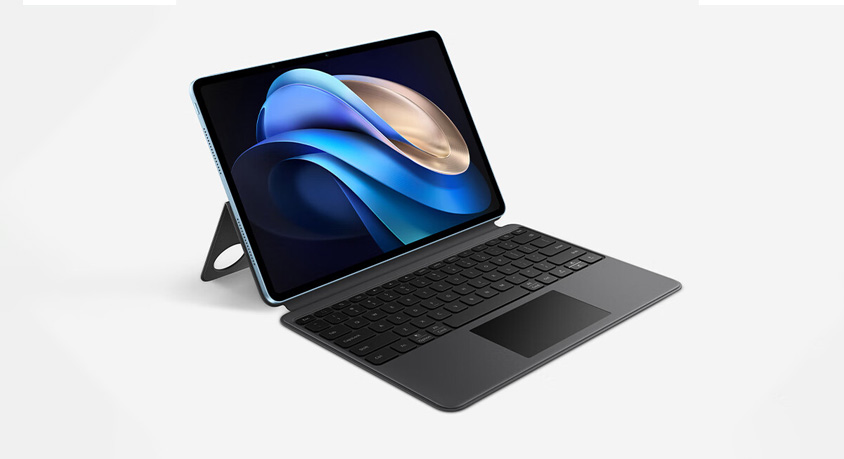
Unboxing the iPad Pro is an experience in minimalist aspiration. The all-screen design, the sleek aluminum unibody, the satisfying magnetic attachment of accessories like the Apple Pencil and the Magic Keyboard—it all screams premium productivity. The Magic Keyboard, with its responsive trackpad and backlit keys, physically transforms the device into a laptop silhouette. This hardware narrative is compelling and complete. It sets an expectation of capability. You feel you are holding a next-generation computer. Then you turn it on, and you are greeted by the familiar grid of app icons. The illusion remains intact until you attempt to do actual, multi-faceted work.
The performance under iPadOS is a study in untapped potential. Applications launch instantly. Complex 4K video timelines in DaVinci Resolve or LumaFusion scrub with buttery smoothness. 3D models render quickly. The hardware handles these isolated, intensive tasks with breathtaking ease and silence. The battery life is exceptional, easily lasting a full day of active use. This is where the iPad Pro excels: as a focused, single-app powerhouse for content creation, consumption, and specific professional workflows like digital art, music production, or on-the-go video editing. It is a superlative tablet.
The friction arises the moment your workflow requires the interconnected, multi-window, file-system-aware nature of traditional desktop operating systems. Stage Manager, Apple’s attempt at a windowing system, feels like a facade. It allows for multiple app windows, but the process of arranging them, resizing them, and managing the files between them is clunky and unintuitive compared to macOS or Windows. You cannot have two instances of the same app open side-by-side easily (like two Word documents). The file system, while improved, remains a sandboxed maze where apps often cannot directly see or manipulate files outside their own designated folders unless you jump through export/import hoops. You are running mobile applications, many of which are still simplified versions of their desktop counterparts, lacking advanced menus, plug-in support, or robust multi-document interfaces.
Consider a concrete scenario: you are researching a report. On a laptop, you naturally have a browser with a dozen tabs open, a word processor, a note-taking app, and a PDF reader, all in resizable, overlapping windows. You drag text and images between them seamlessly. Files are saved directly to a folder of your choice on the internal drive or cloud service, accessible to any application. On the iPad Pro, this becomes a chore. You might have the browser and your word processor in a Stage Manager group, but managing more than three apps feels messy. Sharing content between them often relies on the share sheet, a slower, more indirect process than simple drag-and-drop. The "desktop-class" browser is still fundamentally a mobile browser, struggling with some advanced web applications. The hardware is bored. The M4 chip is idling, waiting for tasks that the operating system refuses to provide.
Therefore, the iPad Pro’s value proposition is narrowly brilliant but fundamentally different from a laptop. It is the ultimate device for a specific user: the digital artist, the field journalist taking notes and editing photos, the musician, the student who consumes and annotates textbooks and writes papers in a linear fashion. It is a phenomenal secondary device for content consumption and light, focused creation.
It is not, and likely will never be under the current paradigm, a replacement for a software developer, a data analyst, a researcher juggling dozens of academic papers and datasets, or anyone whose work involves complex, multi-application workflows and deep file system manipulation. You are not paying for wasted hardware; you are paying for the most exquisite, powerful tablet ever made. The "waste" is a feeling that emerges only when you project laptop expectations onto it. The iPad Pro is not a compromised computer. It is a perfected tablet, and its limitations are the boundaries of that category, enforced not by silicon, but by software philosophy. Buy it for what it is, not for the laptop it imitates in form but refuses to become in function.
Disclaimer: Mention of any brand or trademark is for identification only and does not imply partnership or endorsement