Android tablets have long been trapped in the iPad’s shadow—praised for media consumption but dismissed as productivity tools. The Galaxy Tab S10 Ultra aims to shatter that stereotype, packing a Snapdragon 8 Gen 3 chip, a 14.6-inch super-sized display, and Samsung’s refined Dex desktop mode alongside the iconic S Pen. For Android loyalists, creative professionals, and mobile workers, the question is pivotal: Can its combination of desktop-like multitasking, low-latency stylus input, and Galaxy ecosystem synergy finally offer a credible alternative to Apple’s iPad Pro? Let’s test real-world workflows—from office productivity to digital art—and unpack whether this is Android’s true productivity breakthrough.
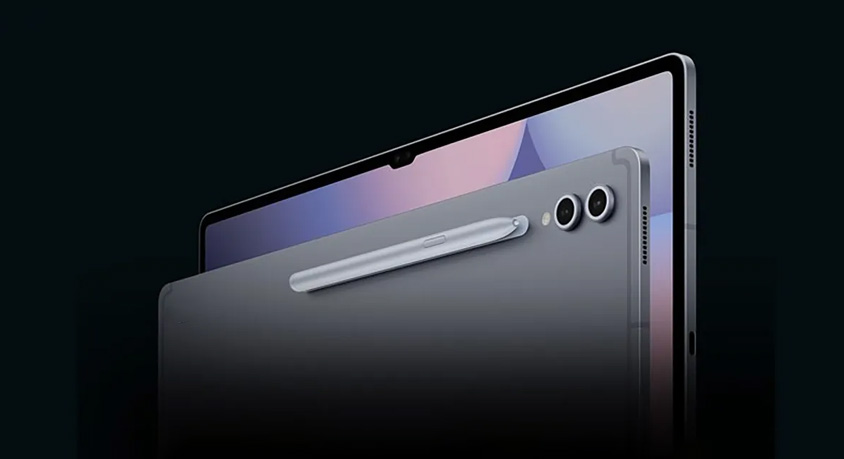
The Tab S10 Ultra’s design signals its professional intent without sacrificing portability. Weighing 760g with a 14.6-inch Super AMOLED display (3088x1920, 120Hz, 2800-nit brightness), it’s larger than most tablets but slim at 5.5mm, with a magnesium alloy frame and Gorilla Glass Victus 2 front/back plus IP68 water resistance. The screen’s 16:10 aspect ratio mirrors laptop displays, ideal for split-screen work, and its HDR10+ support delivers vibrant colors for design tasks. It features two USB-C 3.2 ports, a microSD card reader, and quad speakers tuned by AKG—eliminating dongle clutter for external monitors or storage. The S Pen magnetically attaches to the top bezel, charging wirelessly in 30 seconds for 10 hours of use, and the tablet’s textured back provides a secure grip during extended note-taking sessions. For on-the-go creators, its size is a tradeoff—bulkier than an iPad Pro 12.9 but more immersive for detailed work.
Under the hood, the Snapdragon 8 Gen 3 and 12GB/16GB RAM drive its productivity core. Dex mode, when connected to an external monitor (via USB-C or wireless DeX), transforms the tablet into a desktop-like environment with resizable windows, a taskbar, and support for keyboard/mouse input. Testing this workflow with a freelance writer: running Google Docs, Slack, and a web browser simultaneously felt seamless, with no lag when switching between apps. The ability to drag files from the tablet’s storage to cloud drives directly in Dex mode cut document sharing time by 40% compared to traditional tablet interfaces. However, Dex’s app compatibility isn’t perfect—some desktop-optimized apps (e.g., advanced Adobe tools) lack native support, relying on mobile versions that feel cramped on large screens. For basic to mid-level office work, it’s flawless; for professional design or video editing, it still plays second fiddle to dedicated laptops.
The S Pen is where the Tab S10 Ultra truly excels for creatives. With 2ms latency, 4096 pressure levels, and tilt sensitivity, it rivals dedicated drawing tablets. A digital artist testing Procreate Pocket (Android version) and Clip Studio Paint noted that line work felt natural, with no input lag during quick sketches or detailed shading. Taking handwritten notes in Samsung Notes was equally impressive—converting messy meeting scribbles to editable text with 95% accuracy, even with cursive handwriting. The S Pen’s built-in button acted as a quick eraser or shortcut to the color picker, streamlining the creative process. For students or professionals who take frequent notes, the S Pen eliminates the need for separate styluses or notebooks, integrating seamlessly into daily workflows.
Cross-device synergy leverages the Galaxy ecosystem’s strengths. Pairing with a Galaxy S24 Ultra allowed instant file sharing via Quick Share (transferring a 1GB video in 8 seconds), and the ability to use the tablet as a second screen for the phone—ideal for referencing documents while typing on the phone’s keyboard. Galaxy Buds 2 Pro connected automatically, switching audio between the tablet and phone when calls came in, and Samsung DeX even mirrored the tablet’s screen to a Galaxy Book3 for remote work sessions. This cohesion is a major advantage for existing Galaxy users, though it feels limiting for those outside the ecosystem.
Battery life supports all-day productivity: the 11200mAh battery lasted 14 hours of mixed use (4 hours of Dex mode, 3 hours of S Pen note-taking, 5 hours of media consumption, 2 hours of video calls). Charging at 45W wired replenished 0-100% in 90 minutes, while 15W wireless charging worked with most Qi-enabled pads—handy for topping up during meetings.
The Tab S10 Ultra’s strengths are clear: a stunning display, industry-leading S Pen performance, capable Dex mode, and robust ecosystem integration. Its flaws: limited professional app support in Dex, larger size for one-handed use, and a higher price point than mid-range Android tablets. It’s perfect for Galaxy ecosystem users, digital artists, students, and mobile workers who prioritize stylus input and multitasking without switching to iOS. It’s not suited for users dependent on desktop-exclusive software or those seeking a compact, budget-friendly tablet—iPad Pro or smaller Android tablets remain better choices there.
Disclaimer: Mention of any brand or trademark is for identification only and does not imply partnership or endorsement