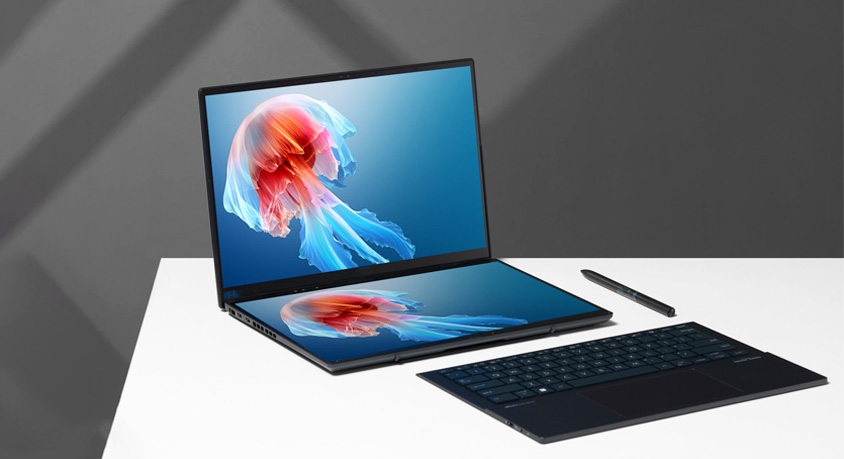
The laptop has followed the same formula for decades: screen on top, keyboard below. It works, so we stopped questioning it. Apple, as usual, is questioning it anyway. The new MacBook Neo removes the physical keyboard entirely and replaces it with a second full-size OLED display. Both screens are 14 inches, both run at 120Hz ProMotion, and both sit behind a seamless sheet of glass. When closed, the device is a single slab just 9.2 millimeters thick. When open, it forces a question we have not had to answer since the first portable computers arrived: what happens when the keyboard itself becomes a screen?
The physical experience is disorienting at first. At 1.4 kilograms, the Neo weighs slightly more than a 14-inch MacBook Pro, but the weight distributes differently because there is no empty space below. The bottom screen uses frosted glass that feels paper-like under your fingers, which matters because the Apple Pencil Pro attaches magnetically to the side. Two Thunderbolt 5 ports handle connectivity. There are no fans, no moving parts, just silence punctuated by haptic thumps when you press virtual keys.
The keyboard lives or dies on those haptics. Apple scaled the trackpad engine across the entire lower surface. Press the glass and localized actuators create a convincing thump. After an hour, you stop thinking about it. The keys render dynamically, which means they change layout depending on context. Spreadsheets show a number pad. Final Cut Pro displays timeline controls. Messages bring up emoji keys where the function row used to be.
The hardware impresses on paper. The M5 Pro chip inside this review unit packs a 12-core CPU and 18-core GPU with 36GB of memory. Geekbench multi-core scores hit 16,000, slightly ahead of the MacBook Pro. The dual OLED panels draw power aggressively, so the 95-watt-hour battery delivers about eight hours of mixed use, not the twelve Apple rates. The 140W charger fills it to 50 percent in twenty minutes, which you will need if you work away from a desk.
Now consider the experience in context. A video editor can keep timelines on the top screen while the bottom holds color grading wheels. A photographer displays Lightroom tools below while the image fills the top. A writer keeps research notes on the bottom while composing above. The flexibility is genuine and, for visual workflows, genuinely productive.
But the keyboard remains the friction point. Haptic keys lack physical travel. The actuators thump convincingly, but they cannot replicate the satisfying bottom-out of a mechanical switch or even the short travel of the Magic Keyboard. After hours of typing, your fingers know something is different. Errors increase, especially on the edges where the glass offers no tactile boundary. Dynamic layouts help in theory, but reaching for a key that moved since your last session slows you down.
The second screen also creates a palm problem. On a normal laptop, your hands rest below the keyboard. On the Neo, your palms cover whatever the bottom screen displays. Apple's software blacks out those areas, but you still feel like you are obscuring your own workspace. The solution is floating your hands while typing, which leads to fatigue. The included folio cover props the device at a steeper angle to encourage this, but it is not a natural way to type.
Battery life under load reveals the physics of two high-refresh OLED panels. Push the Neo with video editing and the percentage drops visibly every few minutes. For a creative location, this introduces anxiety that the MacBook Pro does not. The fast charger helps, but only when you can find an outlet.
Visual creators are the obvious audience. Photographers, videographers, illustrators, and designers will find the dual-screen workflow transformative. Keeping tools on one screen and content on another while using the pencil for direct manipulation replicates a tablet experience with full macOS power. For this user, typing compromises matter less because typing is not their primary input.
The writer, the programmer, the spreadsheet analyst face a harder calculation. The second screen appeals, but the haptic keyboard introduces friction into the activity that defines their work. After a week with the Neo, returning to a MacBook Pro with physical keys feels like coming home. The keys have boundaries. Typing is faster, more accurate, and less tiring.
The Neo is not a Pro replacement. It is a separate category for a specific user who values screen real estate above typing efficiency. For the illustrator in cafes, the video editor on location, this machine offers capabilities no other laptop can match. For everyone else, for the person who writes emails and code, the physical keyboard remains superior. Apple built a beautiful experiment. The engineering is breathtaking. But the experiment reveals a truth about tools that software cannot solve: your body knows the difference between a key that moves and one that does not. The Neo asks you to unlearn decades of muscle memory in exchange for flexibility. Some will make that trade. Others will wait for the keyboard to return.
Disclaimer: Mention of any brand or trademark is for identification only and does not imply partnership or endorsement